
EnCo ASE Threat Assessment for EN 50742: Automated Cybersecurity for Machinery & Manufacturing
By 2027, cybersecurity becomes mandatory for CE marking under the new EU Machinery Regulation (MR). EnCo ASE Threat Assessment guides you step-by-step to achieve full compliance with prEN 50742.
No obligation · Personal consultation · Fast response
The Challenge for Machine Builders
The new EU Machinery Regulation (MR) strictly requires machines to be protected against corruption and malicious cyberattacks. The central harmonized standard for this is EN 50742 (or prEN 50742) — “Protection of machinery against corruption”. Without proof of IT security, CE marking will no longer be possible.
The problem: Manual risk assessments and determining the correct security levels are complex, error-prone, and time-consuming.
EnCo ASE Threat Assessment automates this entire process, ensuring legally compliant and fast certification.
Read our White Paper: Cybersecurity in Machinery Engineering under the New EN 50742
How machinery manufacturers use EnCo ASE and its Threat Assessment module to conduct automated threat assessments and prove compliance with the EU Machinery Regulation 2023/1230.
- The regulatory challenge: EN 50742 and the EU Machinery Regulation
- The Threat Assessment methodology applied to machinery engineering
- Legal compliance at the touch of a button: SRSL, audit-proof documentation, versioning
- Massive time savings: one database for safety and security analyses
PDF · 3 pages · English · free, no registration
Core Features of EnCo ASE Threat Assessment according to EN 50742

Threat Analysis & Risk Assessment
Automatically identify manipulation risks across all machine interfaces (e.g., HMI, remote access, USB ports, OT networks).

Automated SRSL Determination
An intelligent wizard guides you seamlessly through determining the required Safety-Related Security Level (SRSL 0 to SRSL 3).
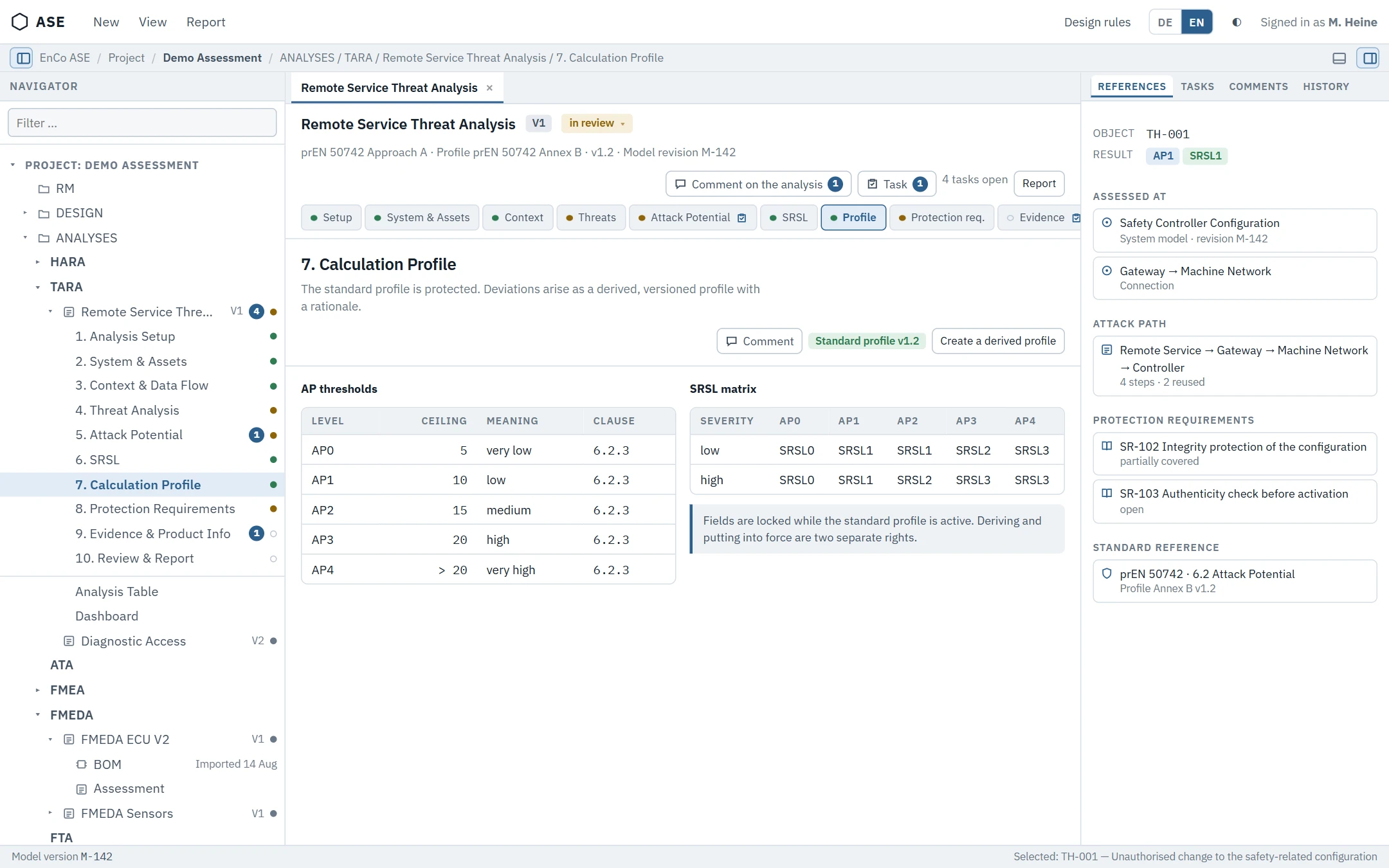
Integrated Mitigation Catalog
Instantly receive standard-compliant recommendations for technical protective measures (e.g., access control, encryption, integrity protection).
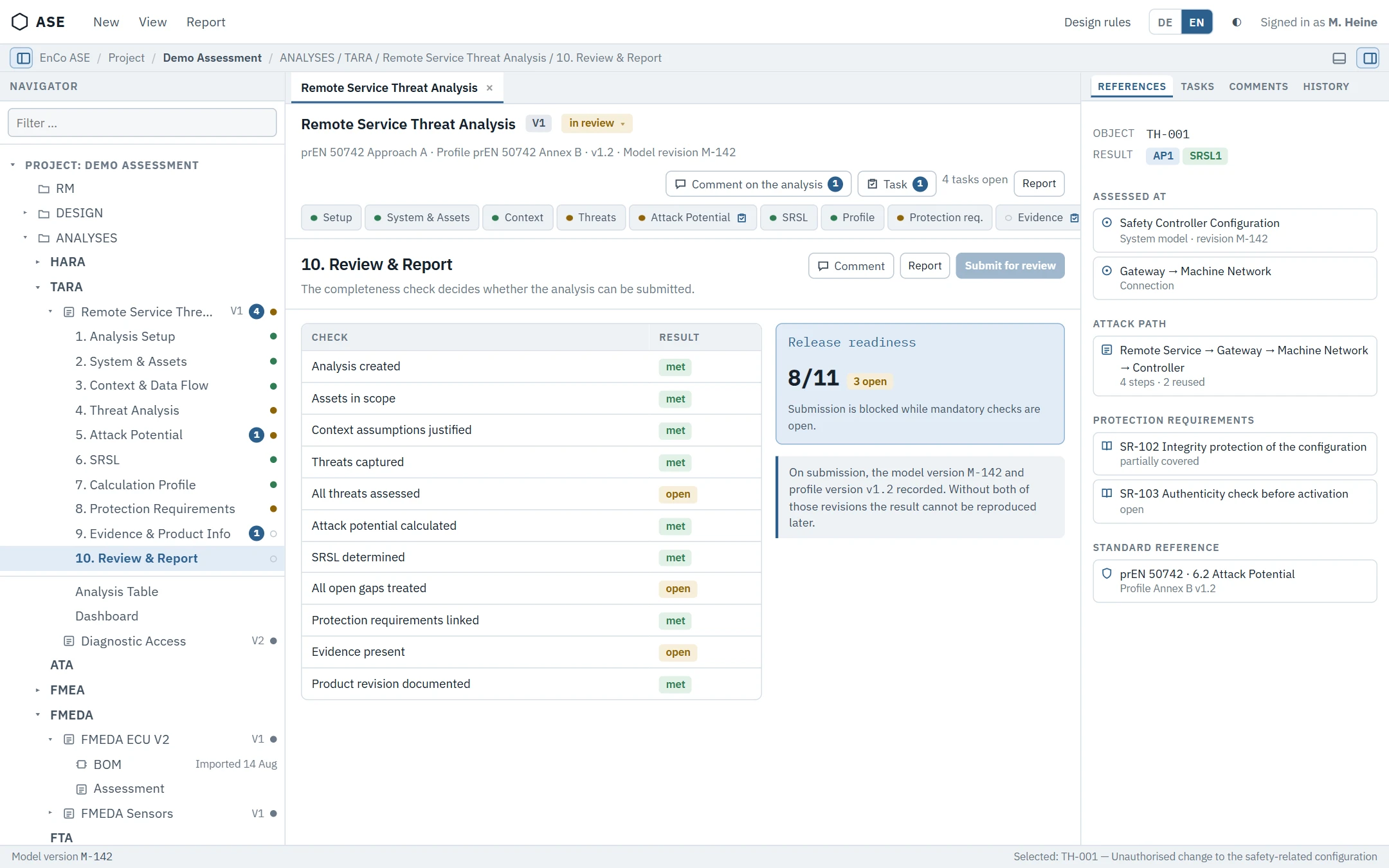
CE Documentation at the Click of a Button
Generate the complete, audit-proof compliance documentation required for the technical file of the EU Machinery Regulation.
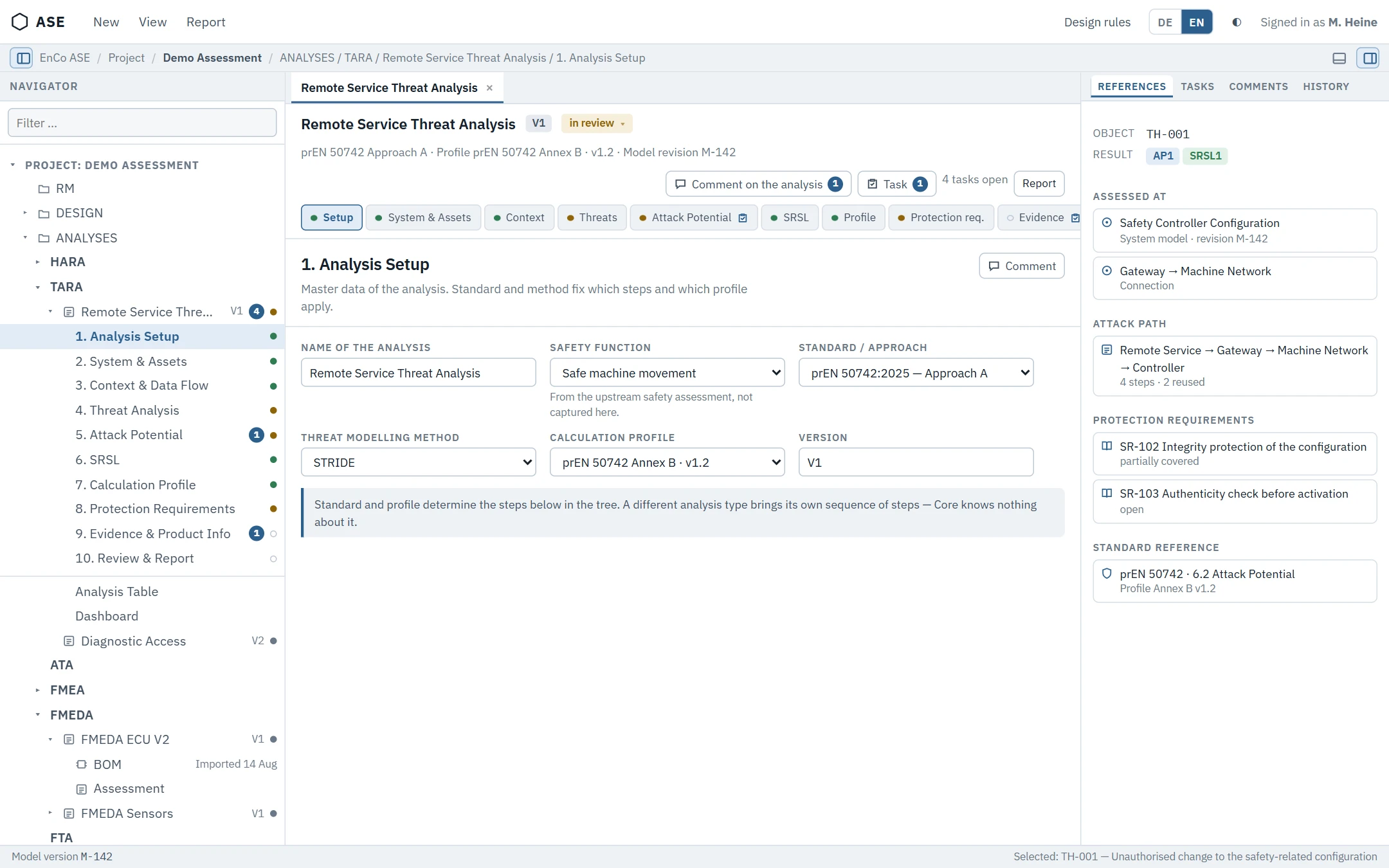
Safety-to-Security Bridging
Effectively bridges the gap between functional safety (ISO 12100) and industrial cybersecurity (IEC 62443).
Who Is EnCo ASE Threat Assessment Designed For?
Machine Builders & OEMs
To seamlessly integrate cybersecurity into the engineering and design phase.
CE Compliance Managers
For fast, structured, and audit-proof CE marking and certification.
System Integrators
To secure connected production lines and industrial OT infrastructures.
Threat Assessment Workflow Based on prEN 50742
EnCo ASE supports your team throughout the threat assessment for machinery cybersecurity – from describing the system and its assets to identifying threats, assessing risks and defining protective measures.
System &
Assets
Describe the machinery, its interfaces and the assets that need protection
Data Flow
Modelling
Model components, data flows and trust boundaries as the basis of the analysis
Threat
Identification
Identify threats for every element using the six threat categories
Risk
Assessment
Assess likelihood and impact and derive the risk level of each threat
Protective
Measures
Define security measures and assign them to the identified threats
Residual Risk &
Iteration
Re-assess the residual risk until the required protection level is reached
Documentation &
Review
Document results and support review, approval and compliance evidence
EnCo ASE guides you through the complete threat assessment for prEN 50742 – with integrated data, reuse of engineering knowledge and real-time collaboration.
Integrated Engineering. Connected Threat Assessment.
EnCo ASE connects the threat assessment with requirements, system structures and other safety and security analyses, so engineering information can be reused, traced and maintained across the entire development process.
Requirements
Link requirements and relevant engineering information directly to the threat assessment.
System Design
Reuse system structures, interfaces and data flows in the analysis.
Threat Assessment
Develop structured threat assessments with connected engineering data instead of isolated information.
Attack Trees
Investigate threat scenarios in detail with the connected attack tree analysis.
HARA ISO 12100
Relate cybersecurity threats to the machinery risk assessment and its safety functions.
Reporting
Use structured engineering data for consistent reports and project documentation.
End-to-End Traceability
Maintain relationships between requirements, system elements, assets, threats and downstream analyses.
Reuse Engineering Knowledge
Use existing information across analyses and projects instead of maintaining the same knowledge several times.
Consistent Engineering Data
Work with connected data instead of isolated documents and reduce inconsistencies between disciplines.
The threat assessment becomes part of the engineering model. EnCo ASE lets teams connect analysis data across requirements, system design and security engineering instead of managing the threat assessment as an isolated document.
Connect Threat Assessment with Your Engineering Toolchain
Import existing engineering information, exchange structured threat assessment data and export results for further use in your development environment. EnCo ASE integrates the threat assessment into established engineering workflows instead of creating another isolated data source.
Import
Bring existing engineering and analysis information into EnCo ASE and use available project data as the basis for further analyses.
Data Exchange
Exchange structured engineering information between EnCo ASE and other systems while preserving the relevant relationships.
Export
Export threat assessment information and analysis results for documentation, communication and further use in your engineering environment.
Toolchain Integration
Connect threat assessment activities with the surrounding engineering processes and keep information available where your teams need it.
Use Existing Data
Build on engineering information that already exists instead of recreating it manually in the threat assessment.
Reduce Duplicate Work
Exchange structured information across engineering activities and avoid unnecessary manual data transfer.
Keep Engineering Connected
Integrate the threat assessment into the overall development process and preserve the links between relevant information.
Your threat assessment does not have to stay isolated. EnCo ASE helps you move engineering information into, through and out of the threat assessment process – connected with your entire engineering environment.
Technical Overview
Key technical capabilities of EnCo ASE Threat Assessment at a glance.
prEN 50742
Threat Assessment Threat Assessment
Predefined & Project Specific
Risk Calculation
Multi User
Engineering
Catalogs &
Reusable Threat Data
Requirements, System Design
& Attack Trees
Import, Export &
Excel Reporting
Ready to Improve Your Threat Assessment Workflow?
Discover how EnCo ASE supports your engineering team with a structured prEN 50742 threat assessment workflow, integrated engineering data and efficient knowledge reuse.
FAQ – Frequently Asked Questions about EN 50742 & EU MR
What is the EN 50742 standard?
The EN 50742 standard (“Protection of machinery against corruption”) defines the specific cybersecurity requirements for the safety-related control systems of machinery. It specifies how machines must be protected against unauthorized modifications to prevent functional safety from being compromised.
How do the EU Machinery Regulation and EN 50742 relate?
The EU Machinery Regulation (MR) introduces cybersecurity as a fundamental health and safety requirement in Annex III. EN 50742 is set to be the harmonized standard that grants manufacturers the “presumption of conformity” for this specific legal requirement.
What does SRSL mean in EN 50742?
SRSL stands for Safety-Related Security Level (ranging from SRSL 0 to SRSL 3). The higher the risk of manipulation affecting physical machine safety, the higher the required SRSL, and the stricter the technical protective measures must be.

