FMEA Software for Structured Risk Analysis
Create, manage and collaborate on FMEAs according to the AIAG & VDA 7 Step Method within an integrated engineering environment.
No obligation · Personal consultation · Fast response
FMEA Workflow Based on the AIAG & VDA 7 Step Method
EnCo SOX FMEA supports your team throughout the complete FMEA process, from initial planning and structure analysis to risk evaluation, optimization and results documentation.
Planning &
Preparation
Define scope, team and boundaries
Structure
Analysis
Analyze system structure and interfaces
Function
Analysis
Analyze functions, requirements and characteristics
Failure
Analysis
Identify failure modes, effects and causes
Risk
Analysis
Evaluate risks and prioritize actions
Optimization
Define and implement actions
Results
Documentation
Document results and communicate outcomes
EnCo SOX FMEA guides you through the complete 7 step methodology with integrated data, reuse of engineering knowledge and real time collaboration.
Core FMEA Capabilities
From system structures and function networks to failure analysis, risk evaluation and optimization, EnCo SOX provides the tools required to develop and maintain structured FMEAs.
Structure & Function Analysis
Build the structure of your system, product or process and connect functions with the corresponding system elements to create a consistent foundation for the FMEA.
- Create hierarchical system and product structures
- Define and organize system elements and their relationships
- Assign functions to the corresponding system elements
- Build structured function relationships across system levels
Failure Analysis
Analyze potential failures systematically and establish relationships between failure effects, failure modes and failure causes across the system structure.
- Identify failure modes, effects and causes
- Build structured failure relationships
- Trace failures across different system levels
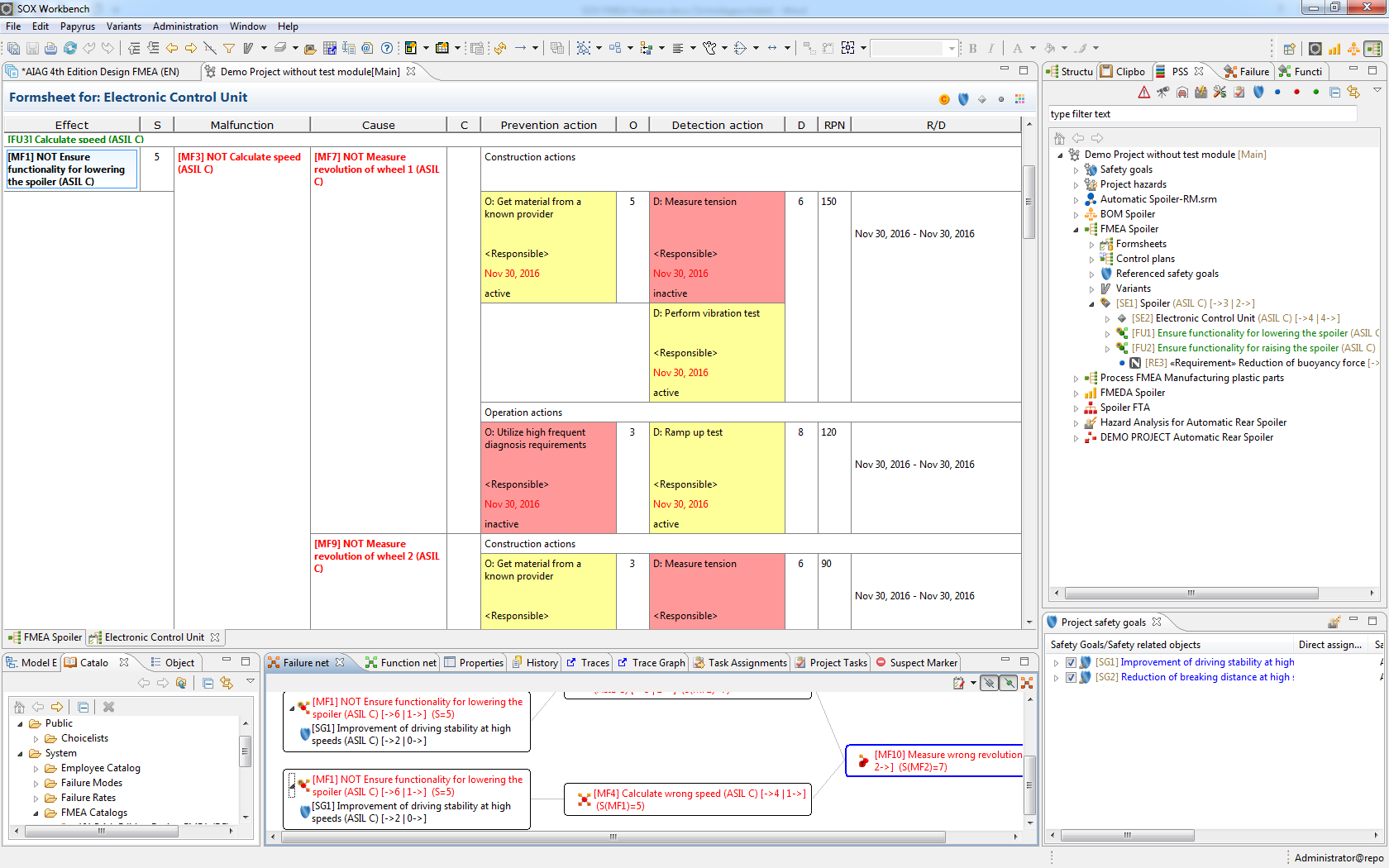
Risk Analysis & Optimization
Evaluate identified risks and connect the results directly with prevention and detection actions to support a structured optimization process within the FMEA.
- Evaluate severity, occurrence and detection
- Apply Action Priority according to AIAG & VDA
- Define prevention and detection actions
- Assign and track optimization activities within the FMEA
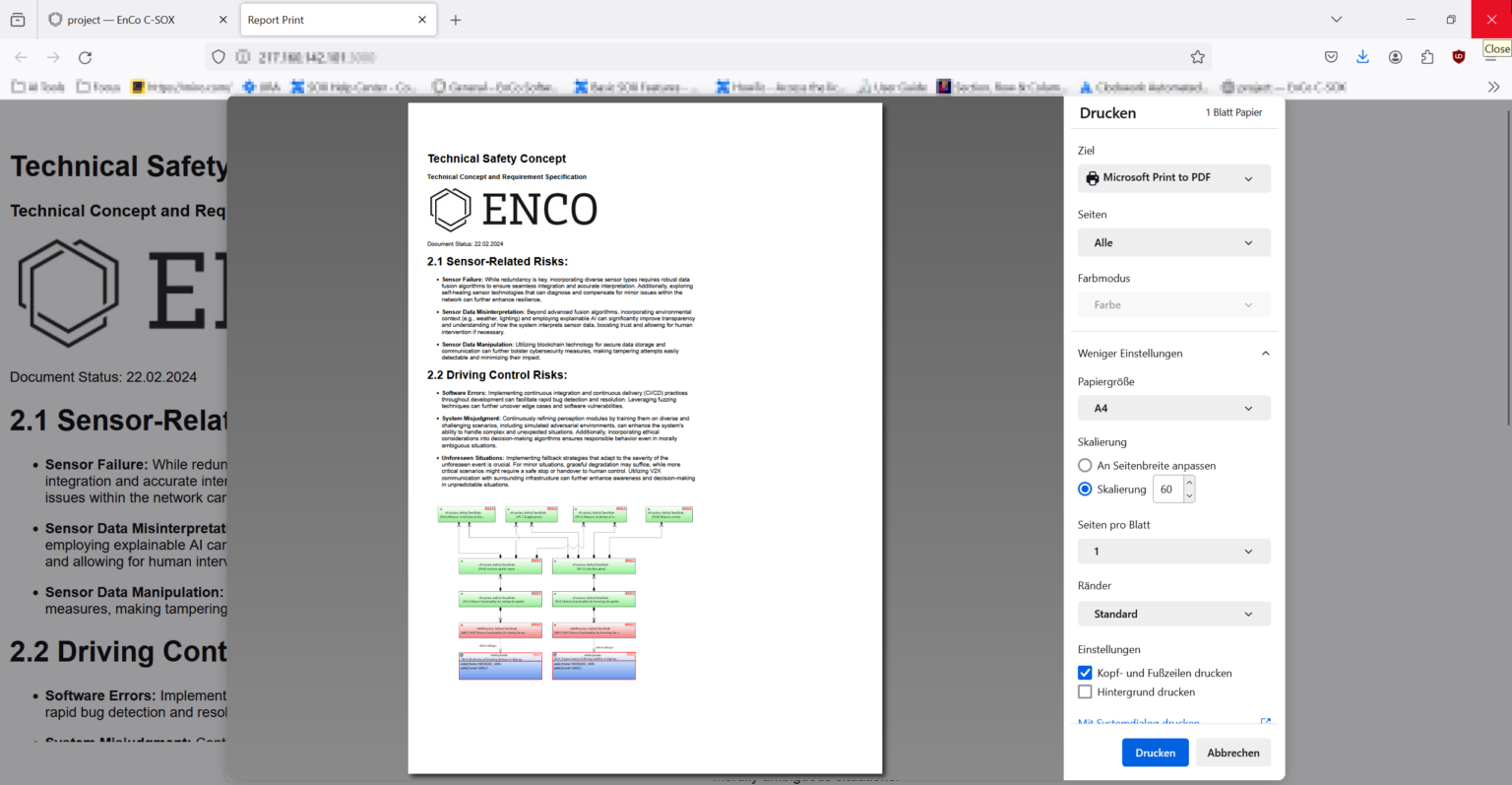
Documentation, Reporting & Export
Keep FMEA information structured and accessible and prepare analysis results for engineering reviews, project documentation and exchange with customers and partners.
- Maintain structured FMEA documentation
- Generate reports and FMEA form sheets
- Export FMEA data in the AIAG & VDA exchange format
- Keep analysis results accessible for engineering reviews
- Support exchange of FMEA results across teams, customers and engineering environments
Integrated Engineering. Connected FMEA.
EnCo SOX connects FMEA with requirements, system structures and additional safety analyses so engineering information can be reused, traced and maintained across the development process.
Requirements
Connect requirements and relevant engineering information directly with the FMEA.
System Design
Reuse system structures, interfaces and engineering relationships within the analysis.
FMEA
Develop structured FMEAs using connected engineering data instead of isolated information.
FMEDA
Reuse relevant failure information for quantitative safety analysis and diagnostic evaluation.
FTA
Connect failure information with fault tree analysis for deeper system level evaluation.
Reporting
Use structured engineering data to create consistent reports and project documentation.
End to End Traceability
Maintain relationships between requirements, system elements, functions, failures and downstream analyses.
Reuse Engineering Knowledge
Use existing information across analyses and projects instead of maintaining the same engineering knowledge multiple times.
Consistent Engineering Data
Work with connected data rather than isolated documents and reduce inconsistencies between engineering disciplines.
FMEA becomes part of the engineering model. EnCo SOX allows teams to connect analysis data across requirements, system design and safety engineering instead of managing FMEA as an isolated document.
Connect FMEA with Your Engineering Toolchain
Import existing engineering information, exchange structured FMEA data and export results for further use across your development environment. EnCo SOX helps integrate FMEA into established engineering workflows instead of creating another isolated data source.
Import
Bring existing engineering and FMEA information into EnCo SOX and use available project data as the foundation for further analysis.
Data Exchange
Exchange structured engineering information between EnCo SOX and other systems while preserving relevant relationships within your workflow.
Export
Export FMEA information and analysis results for documentation, communication and further use in your engineering environment.
Toolchain Integration
Connect FMEA activities with surrounding engineering processes and keep information available where your teams need it.
Use Existing Data
Build on engineering information that already exists instead of recreating it manually inside the FMEA.
Reduce Duplicate Work
Exchange and reuse structured information across engineering activities and reduce unnecessary manual data transfer.
Keep Engineering Connected
Integrate FMEA into the wider development process and maintain connections between relevant engineering information.
Your FMEA does not have to live in isolation. EnCo SOX helps you move engineering information into, through and out of the FMEA process while keeping it connected to your wider engineering environment.
Technical Overview
Key technical capabilities of EnCo SOX FMEA at a glance.
AIAG & VDA
7 Step FMEA
Design FMEA &
System FMEA
Multi User
Engineering
Catalogues &
Reusable FMEA Data
Requirements, System Design,
FMEDA & FTA
Import, Export &
Toolchain Integration
Extend Your FMEA Workflow with AI
Use existing requirements, specifications and engineering knowledge to prepare and review FMEA content with Datapetal AI.
- Generate structured FMEA drafts
- Review existing FMEAs for gaps and improvements
- Reuse knowledge from documents, FMEAs and transcripts
- Integrate results into your existing workflow
Ready to Improve Your FMEA Workflow?
See how EnCo SOX FMEA can support your engineering team with a structured FMEA workflow, integrated engineering data and efficient knowledge reuse.
Schedule Your Free ConsultationFrequently Asked Questions About FMEA Software
Find answers to common questions about EnCo SOX FMEA, the AIAG & VDA 7 Step methodology, collaborative FMEA development and the integration of FMEA into your engineering processes.
What is FMEA software?
FMEA software supports engineering teams in systematically identifying potential failure modes, analyzing their effects and causes, evaluating risks and defining appropriate actions. Compared with spreadsheet based approaches, dedicated FMEA software can provide structured workflows, consistent engineering data, knowledge reuse, collaboration and traceable documentation.
What is EnCo SOX FMEA?
EnCo SOX FMEA is a dedicated solution for performing structured Failure Mode and Effects Analysis within the EnCo SOX engineering environment. It supports engineering teams throughout the FMEA process and connects FMEA information with related engineering data and methods.
Does EnCo SOX FMEA support the AIAG & VDA 7 Step methodology?
Yes. EnCo SOX FMEA supports the structured 7 Step FMEA approach, covering planning and preparation, structure analysis, function analysis, failure analysis, risk analysis, optimization and results documentation.
Which types of FMEA can be performed with EnCo SOX?
EnCo SOX supports structured FMEA analysis for engineering applications including Design FMEA and System FMEA. The analysis can be connected with system structures, functions, requirements and other relevant engineering information within the SOX environment.
How does EnCo SOX support the FMEA workflow?
EnCo SOX guides engineering teams through the individual stages of the FMEA process. Structures, functions, failure modes, effects, causes, risk evaluations and optimization actions can be managed within a connected engineering environment instead of being maintained as isolated information.
Can existing FMEA knowledge be reused in new projects?
Yes. Reusing existing engineering knowledge is an important part of an efficient FMEA process. EnCo SOX enables teams to work with reusable information and catalogues so that established knowledge does not have to be recreated for every new analysis or project.
Can multiple engineers collaborate on an FMEA?
EnCo SOX is designed to support collaborative engineering workflows. This allows FMEA information to be developed and maintained within a shared engineering environment instead of relying on separate spreadsheet files distributed between individual team members.
How is FMEA connected with requirements and system design?
FMEA is most effective when it is connected with the engineering information on which the analysis is based. Within EnCo SOX, FMEA can be integrated with related engineering disciplines such as requirements and system design, helping teams maintain relationships between the analysis and the underlying product or system information.
Can FMEA be connected with FMEDA and Fault Tree Analysis?
EnCo SOX provides an engineering environment that includes methods such as FMEA, FMEDA and Fault Tree Analysis. This allows related safety engineering activities to be handled within a connected tool environment and enables engineering information to be used across different analysis activities.
Does EnCo SOX support FMEA import and export?
EnCo SOX provides options for exchanging engineering and FMEA information with other environments. The available import and export options depend on the required data, workflow and target system. Contact us if you need to evaluate a specific exchange format or existing toolchain.
Can AI be used with EnCo SOX FMEA?
Yes. EnCo Software offers AI assisted FMEA capabilities with Datapetal. Existing requirements, specifications, FMEAs and other engineering knowledge can be used to support the preparation and review of structured FMEA content. The results can then be reviewed by engineering experts and integrated into the established FMEA workflow.
Does AI replace the FMEA engineer or FMEA moderator?
No. AI can support activities such as preparing, structuring and reviewing FMEA content, but technical validation and engineering decisions still require qualified experts. Risk assessment, prioritization, appropriate actions and final approval remain engineering responsibilities.
Why use dedicated FMEA software instead of Excel?
Spreadsheets can be useful for simple analyses, but they become increasingly difficult to manage when FMEAs grow in size, complexity or number of contributors. Dedicated FMEA software provides structured relationships between engineering information, supports consistent methodology and knowledge reuse, and makes collaborative and traceable FMEA development easier to manage.
Is EnCo SOX FMEA suitable for automotive engineering?
Yes. EnCo SOX FMEA is designed for structured engineering applications and supports the AIAG & VDA 7 Step methodology used in automotive FMEA. Its integration with other engineering and safety analysis activities also makes it suitable for safety critical development environments.
