EnCo SOX FMEDA

FMEDA Software for Functional Safety Analysis

Perform structured hardware safety analysis, evaluate failure data and calculate safety metrics within an integrated engineering environment.

ISO 26262 & IEC 61508 Including ISO 26262 Part 11 for Semiconductors
Safety Metrics SPF, LF & PMHF
Integrated Engineering & Safety Data
Request FMEDA Demo

No obligation · Personal consultation · Fast response

From Hardware Architecture to Safety Metrics

EnCo SOX FMEDA supports the hardware safety analysis workflow, from structuring components and assigning failure data to evaluating safety mechanisms and calculating relevant hardware safety metrics.

01

Define Hardware
Structure

Structure the hardware architecture and components that form the basis of the analysis.

02

Assign Failure
Data

Assign failure rates, failure modes and relevant component data to the hardware elements.

03

Analyze Failure
Effects

Evaluate failure effects and classify failures according to their relevance for the safety analysis.

04

Evaluate Safety
Mechanisms

Consider safety mechanisms and diagnostic coverage when evaluating the resulting failure classifications.

05

Calculate Safety
Metrics

Evaluate the analysis results and calculate relevant hardware safety metrics for functional safety assessment and documentation.

Keep component data, failure information, safety mechanisms and calculated results connected. EnCo SOX FMEDA provides a structured environment for maintaining the relationships throughout the complete analysis.

From Component Data to Safety Metrics

Connect component level reliability data, failure modes and safety mechanisms in one consistent FMEDA analysis and derive the resulting hardware safety metrics.

01

Component Data

Component structure, failure rates and technical parameters

02

Failure Modes

Failure modes and failure rate distribution

03

Safety Mechanisms

Diagnostic coverage and effectiveness of safety mechanisms

04

Failure Classification

Classification of safety relevant hardware failures

05

Safety Metrics

SPF, LF and PMHF related analysis results

Connected FMEDA Data

Turn component level reliability data into system level safety metrics. EnCo SOX connects the individual elements of the FMEDA so that changes in component and failure data can be reflected consistently throughout the analysis.

Core FMEDA Capabilities

Structure hardware components, manage failure data, evaluate safety mechanisms and calculate hardware safety metrics within one consistent analysis environment.
ISO 26262
ISO 26262 Part 11 Semiconductor
IEC 61508
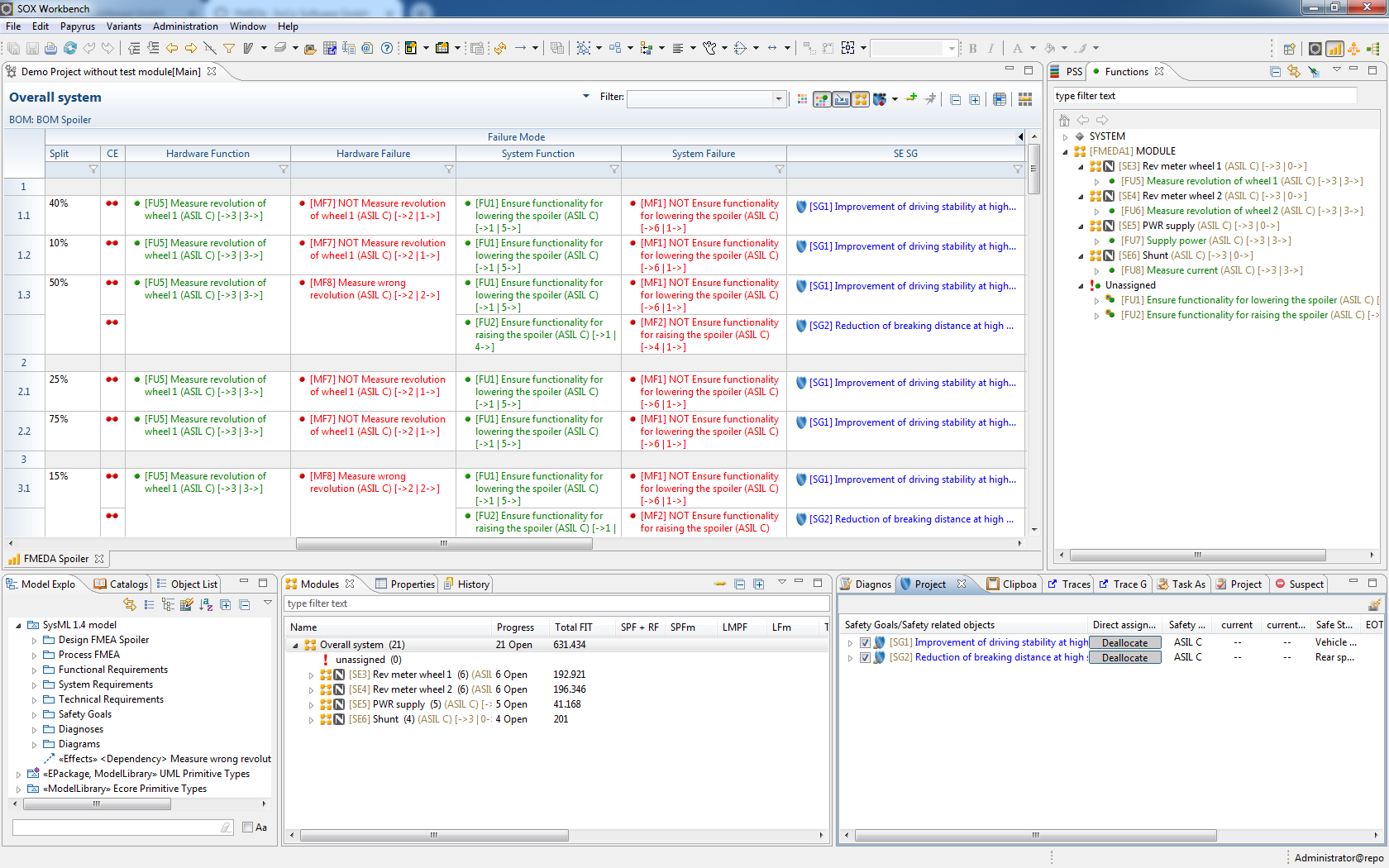
EnCo SOX FMEDA hardware structure and component data
01

Hardware Structure & Component Data

Build the hardware structure of your analysis and organize components and their relevant technical data in a structured engineering environment.

  • Structure hardware components and subcomponents
  • Maintain component specific engineering data
  • Organize analysis data consistently across the hardware structure
  • Create a structured foundation for the FMEDA
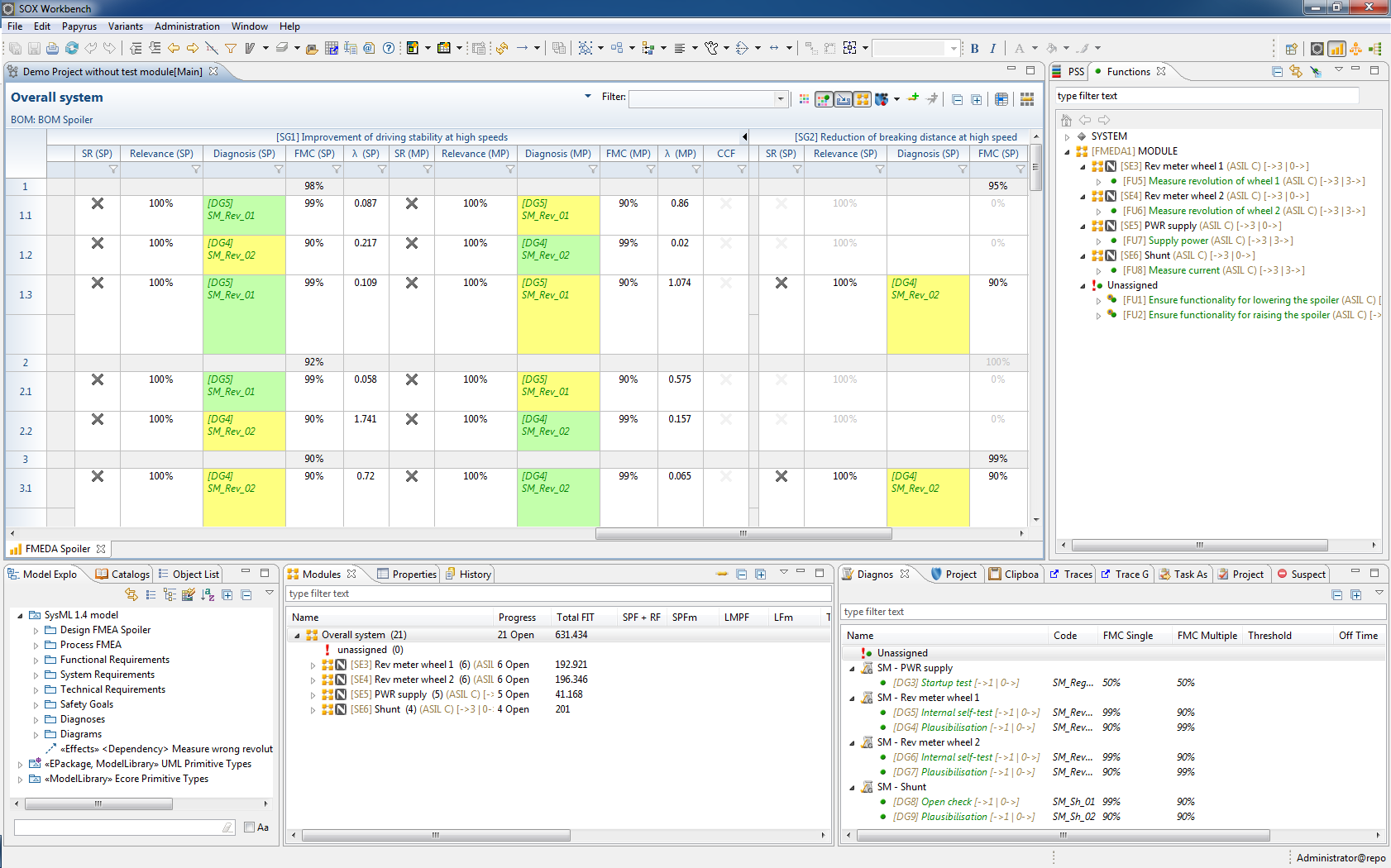
EnCo SOX FMEDA failure data and failure mode analysis
02

Failure Data & Failure Mode Analysis

Assign and maintain failure information for hardware components and use it as the basis for systematic quantitative safety analysis, including semiconductor related FMEDA activities within the context of ISO 26262 Part 11.

  • Assign failure rates to hardware components
  • Define and evaluate component failure modes
  • Distribute failure rates across relevant failure modes
  • Support semiconductor related analysis according to ISO 26262 Part 11
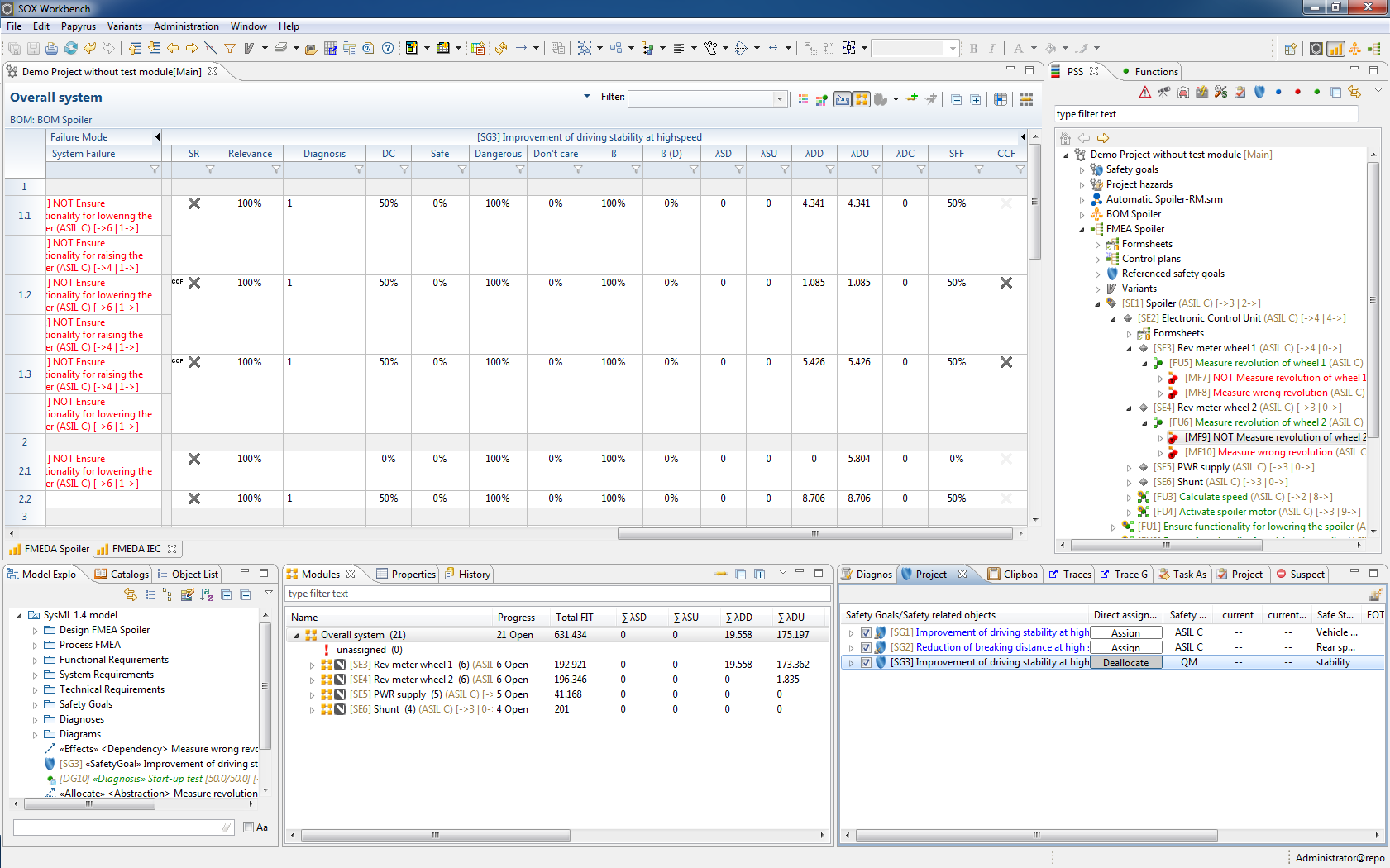
EnCo SOX FMEDA safety mechanisms and failure classification
03

Safety Mechanisms & Failure Classification

Evaluate the impact of safety mechanisms and diagnostic coverage and classify failures within structured functional safety analyses for ISO 26262 and IEC 61508.

  • Define and consider safety mechanisms
  • Evaluate diagnostic coverage
  • Analyze the effect of failures on safety related functions
  • Support systematic failure classification
04

Hardware Safety Metrics & Results

Aggregate the results of the hardware safety analysis and evaluate the resulting metrics within the same structured FMEDA environment.

Safety Metric

SPF

Calculate the Single Point Fault Metric based on the classified hardware failure contributions.

Safety Metric

LF

Evaluate the Latent Fault Metric using the results of the quantitative hardware safety analysis.

Quantitative Evaluation

PMHF

Evaluate PMHF related analysis results based on the accumulated hardware failure contributions.

Analysis Results

Review & Documentation

Aggregate results across the hardware structure and prepare the analysis for engineering review and documentation.

Engineering Integration

Connect FMEDA with related engineering activities and use consistent information across safety analysis, hardware development and documentation.

Engineering Data

Requirements

Connect safety and engineering requirements with the corresponding analysis context.

Hardware Data

Bill of Materials

Use structured BOM information and component data as a consistent foundation for quantitative hardware safety analysis.

Integrated Analysis

FMEDA

Hardware safety analysis connected with your engineering data and related safety activities.

Failure Analysis

FMEA

Connect qualitative failure analysis with quantitative hardware safety evaluation.

Safety Analysis

FTA

Combine FMEDA results with fault tree analysis for a more connected view of hardware related safety risks.

Keep your safety analyses connected. EnCo SOX supports the reuse and exchange of engineering information across requirements, BOM data, FMEDA and related safety analyses, reducing isolated data and supporting consistent engineering workflows.

Data, Libraries & Knowledge Reuse

Build on existing component data, failure information and safety knowledge instead of recreating the same information for every FMEDA and project.

Reusable Data

Component Libraries

Organize reusable component information and make established engineering data available as a foundation for new analyses.

  • Reuse component related engineering information
  • Build consistent data structures across analyses
  • Reduce repeated manual data entry
Reliability Data

Failure Rate Data

Maintain relevant failure information together with the corresponding hardware elements and use it consistently throughout the FMEDA.

  • Maintain component specific failure rates
  • Associate failure data with relevant hardware elements
  • Keep reliability information traceable within the analysis
Safety Knowledge

Reusable Safety Knowledge

Reuse established safety related information such as failure classifications and safety mechanisms where appropriate instead of starting every analysis from scratch.

  • Reuse established analysis knowledge
  • Maintain safety mechanisms consistently
  • Transfer proven information into new analyses
Consistent Engineering

Project Consistency

Use structured and reusable engineering data to support a more consistent FMEDA approach across projects, product variants and teams.

  • Reduce inconsistencies between analyses
  • Support common engineering conventions
  • Improve reuse across projects and variants
Shared Engineering Knowledge One structured foundation for recurring FMEDA activities

Reuse engineering knowledge instead of rebuilding it. EnCo SOX helps teams maintain structured FMEDA information and make relevant component, reliability and safety data available for future analyses and projects.

Technical Overview

Key technical capabilities and supported functional safety standards of EnCo SOX FMEDA at a glance.

Functional Safety Standards

ISO 26262
& IEC 61508

Semiconductor Analysis

ISO 26262
Part 11

Analysis Scope

Components, Failure Modes
& Hardware Effects

Safety Metrics

SPF, LF
& PMHF

Failure Data

Failure Rates &
Failure Classification

Safety Mechanisms

Diagnostic Coverage &
Failure Detection

When Does Dedicated FMEDA Software Become Valuable?

Spreadsheets can work for smaller analyses. As FMEDAs become more complex, dedicated software helps teams manage connected data, reuse engineering knowledge and maintain consistent calculations across the analysis.

Traditional Approach

Spreadsheet Based FMEDA

Manual Relationships

Relationships between components, failure data and calculated results often need to be maintained manually.

Repeated Data Entry

Existing component and failure information may need to be copied and maintained again across analyses and projects.

Formula Maintenance

Calculations can depend heavily on spreadsheet formulas, references and manual maintenance.

Difficult Change Management

Changes to component or failure data may require updates in several places throughout the analysis.

File Based Collaboration

Collaboration often relies on exchanging and coordinating separate files between engineers.

Structured Approach

Integrated FMEDA with EnCo SOX

Connected Engineering Data

Maintain structured relationships between hardware elements, failure information, safety mechanisms and analysis results.

Reusable Information

Reuse established component, failure and safety information instead of rebuilding the same analysis data repeatedly.

Consistent Analysis Logic

Keep calculations and resulting safety metrics within the structured FMEDA analysis environment.

Connected Updates

Maintain related information within one model so changes can be handled more consistently throughout the analysis.

Shared Engineering Environment

Work with structured analysis data in a common engineering environment instead of relying solely on file exchange.

FMEDA becomes more difficult to maintain as the analysis grows. EnCo SOX provides a structured environment for managing component data, failure information, safety mechanisms and calculated results while maintaining the relationships between them.

Frequently Asked Questions About FMEDA Software

Find answers to common questions about FMEDA, hardware safety analysis, failure rate data, safety mechanisms, ISO 26262, ISO 26262 Part 11, IEC 61508 and the use of EnCo SOX for structured functional safety engineering.

What is FMEDA?

FMEDA stands for Failure Modes, Effects and Diagnostic Analysis. It is a quantitative safety analysis method used to examine hardware components, their failure modes, failure rates and the effectiveness of safety mechanisms. FMEDA supports the evaluation of hardware architectures and the calculation of safety related metrics.

What is FMEDA software?

FMEDA software provides a structured environment for managing component data, failure modes, failure rates, failure classifications and safety mechanisms. Dedicated software can reduce the manual effort involved in maintaining complex FMEDA calculations and helps engineering teams keep analysis data, relationships and calculated safety metrics consistent.

What is EnCo SOX FMEDA?

EnCo SOX FMEDA is a dedicated solution for performing structured hardware safety analyses within the EnCo SOX engineering environment. It supports the management of component and failure data, safety mechanisms, failure classifications and the calculation of relevant hardware safety metrics.

How does FMEDA differ from FMEA?

FMEA systematically identifies potential failure modes, their effects and causes and supports the evaluation and reduction of associated risks. FMEDA extends the analysis with quantitative hardware reliability and diagnostic information. It considers aspects such as component failure rates, failure mode distributions, diagnostic coverage and safety mechanisms to evaluate the hardware architecture quantitatively.

Does EnCo SOX FMEDA support ISO 26262 hardware safety analysis?

Yes. EnCo SOX FMEDA supports hardware safety analysis in the context of ISO 26262. Engineering teams can structure hardware elements, analyze relevant failure information, consider safety mechanisms and evaluate quantitative results used for functional safety assessment.

Does EnCo SOX FMEDA support ISO 26262 Part 11 for semiconductors?

Yes. EnCo SOX FMEDA supports semiconductor related safety analysis in the context of ISO 26262 Part 11. Semiconductor components and their relevant failure information can be represented within the FMEDA so that failure modes, failure rate distributions, safety mechanisms and resulting quantitative contributions can be evaluated within a structured analysis environment.

Does EnCo SOX FMEDA support IEC 61508?

Yes. EnCo SOX FMEDA can also be used for functional safety analyses in the context of IEC 61508. Hardware components, failure rates, failure modes, safety mechanisms and diagnostic information can be analyzed within the same structured FMEDA environment for applications beyond automotive development.

Which hardware safety metrics can be evaluated with FMEDA?

FMEDA provides the quantitative basis for evaluating hardware safety metrics used in functional safety development. Depending on the analysis and project context, this includes metrics such as the Single Point Fault Metric, Latent Fault Metric and Probabilistic Metric for random Hardware Failures, commonly referred to as SPF, LF and PMHF.

How are component failure rates used in FMEDA?

Component failure rates provide the quantitative basis for the FMEDA. Failure rate information is combined with the relevant failure modes, failure mode distributions, classifications and safety mechanisms to determine how individual hardware failures contribute to the overall safety analysis.

Can component and failure data be reused across FMEDA projects?

Yes. EnCo SOX supports the reuse of established engineering information through structured data and libraries. Reusable component, failure and safety information can reduce repetitive work and help teams maintain consistent analysis assumptions across products and projects.

How are safety mechanisms considered in an FMEDA?

Safety mechanisms are evaluated in relation to the failures they are intended to detect, control or mitigate. Their effectiveness influences the classification and quantitative contribution of failures within the FMEDA and therefore plays an important role in evaluating the resulting hardware safety metrics.

Can FMEDA be connected with FMEA and Fault Tree Analysis?

EnCo SOX provides an engineering environment that includes FMEA, FMEDA and Fault Tree Analysis. This enables related safety engineering activities to be handled within a common tool environment and allows relevant engineering information to be used across different analysis methods.

Can FMEDA be connected with requirements and system design?

Within the EnCo SOX engineering environment, FMEDA can be used alongside related engineering disciplines such as requirements management and system design. This helps teams maintain the relationship between safety analysis information and the engineering data on which the analysis is based.

Can multiple engineers collaborate on an FMEDA?

EnCo SOX is designed for collaborative engineering workflows. FMEDA information can be developed and maintained within a shared engineering environment, reducing the dependency on separately maintained analysis files and improving consistency when several engineers contribute to an analysis.

Why use dedicated FMEDA software instead of Excel?

Spreadsheets can be suitable for smaller FMEDAs, but maintaining component relationships, failure data, safety mechanisms and calculation logic becomes increasingly difficult as an analysis grows. Dedicated FMEDA software provides structured data relationships, reusable engineering information and a consistent analysis environment that can make complex FMEDAs easier to maintain and review.

Is EnCo SOX FMEDA suitable for automotive functional safety?

Yes. EnCo SOX FMEDA supports hardware safety analysis for automotive functional safety development in the context of ISO 26262, including semiconductor related analysis according to ISO 26262 Part 11. Its integration with related engineering and safety methods also supports connected functional safety activities within the EnCo SOX environment.

Ready to Improve Your FMEDA Workflow?

See how EnCo SOX FMEDA can support your functional safety team with structured hardware safety analysis, connected engineering data and consistent evaluation of safety metrics.

Schedule Your Free Consultation
No obligation · Personal consultation · Fast response